McKinsey & Company. Product Design Lead, Technology & Digital Co-Creative Problem Solving. Sole product designer. March 2022 to March 2023.
Slide reuse
90 seconds
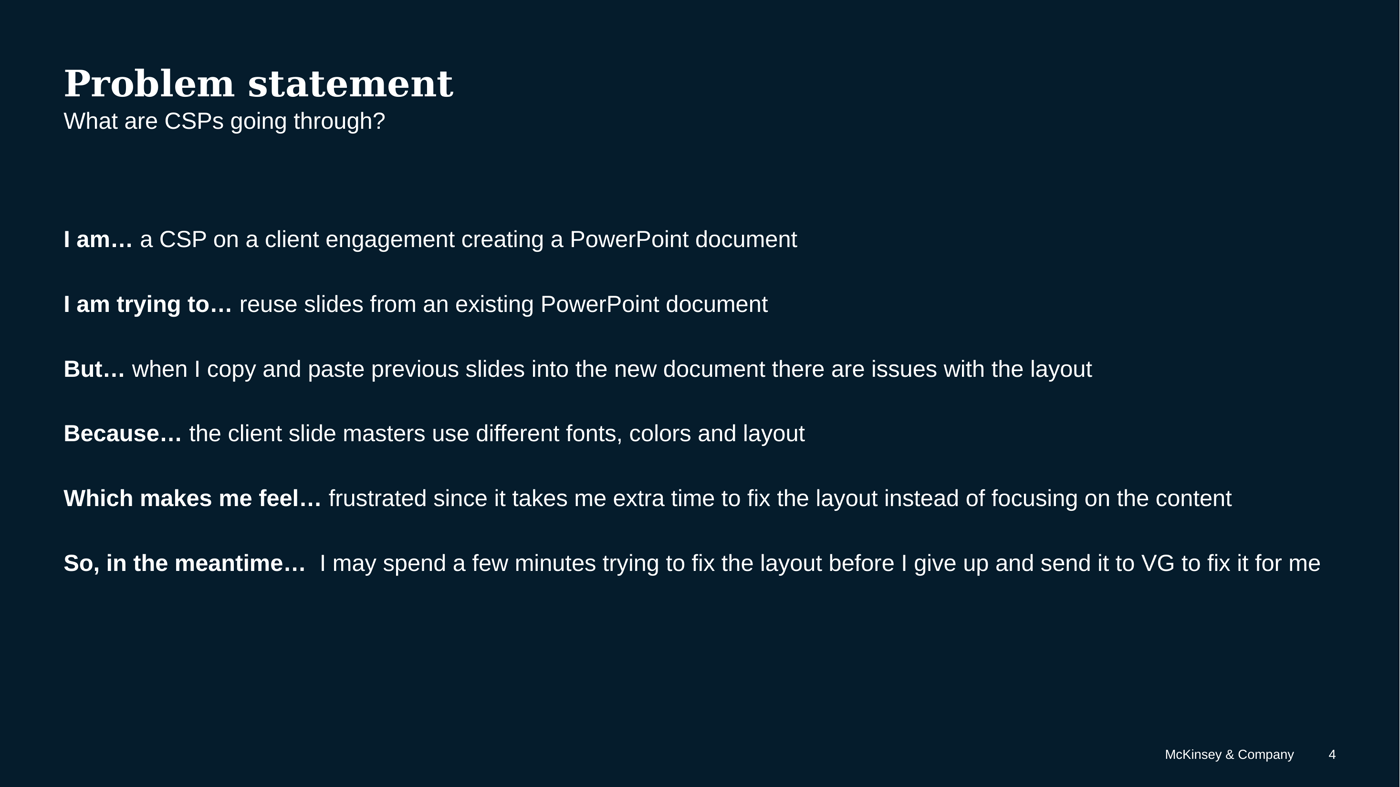
Problem. Consultants copy slides from a past deck into a new one, the layout breaks, and they send the cleanup to the graphics team. The existing format tool only converted to the firm template. Most reuse landed in a client template.
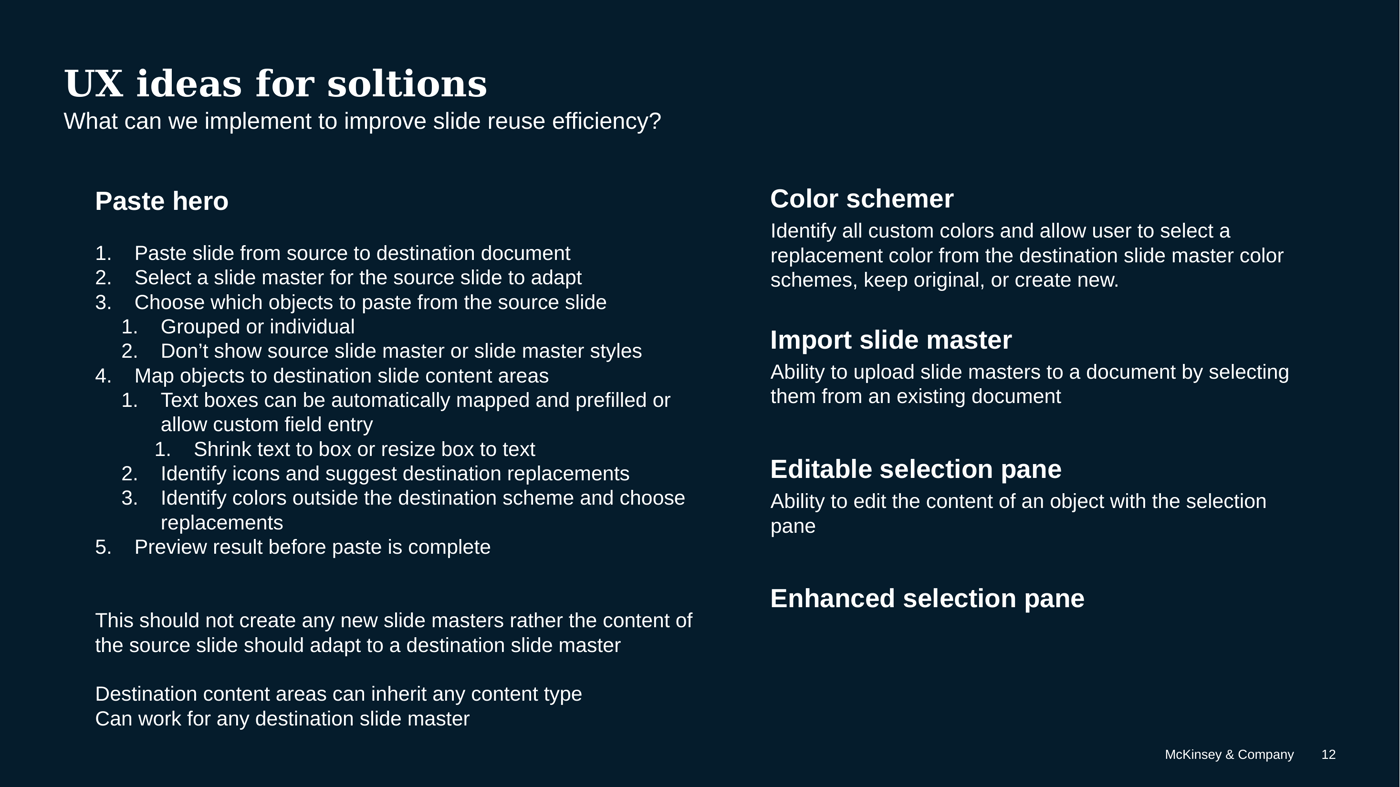
Decision. I decided to stop importing the source master on paste. Content adapts to a destination master the consultant chooses. They pick which objects come along. Preview before commit.
Tradeoff. I killed importing the source master. I did not treat the existing format tool as the strategy, because it only knew the firm template. I deferred color mapping and findability until paste behavior was right. I did not grow a pile of blended masters that increase file size and leak the last client's identity.
Result. I specified paste without importing the source master: destination master, object picker, preview. Survey counts and interviews are method, not an outcome. Whether that workflow reached production is not sourced.
What I would do differently. I would instrument graphics-team volume and cleanup time before treating reuse as shipped. I do not claim production.
Scope
Decided
Paste without importing the source master. Destination master, object picker, preview.
Killed
Treating the firm-template format tool as the reuse strategy. Accidental extra masters.
Measured
Draft
1. Context and my role
I was Product Design Lead, Technology & Digital Co-Creative Problem Solving, at McKinsey & Company, March 2022 to March 2023, in New York. Sole product designer on McKinsey's custom PowerPoint platform for client communications. I owned the workstream. Product signed off. Engineering signed off.
I led research and design for new features and enhancements from user feedback and usage analytics. I translated partner and consultant workflows into detailed interaction design. I owned the workstream from concept through release.
Product owned the platform. The graphics team was the downstream team consultants escalated to. I sat with both, plus research and media design, before I went to consultants. I led research and design for the reuse workflow, and I designed related platform work (ribbon, directory, slide management, what's new).
2. Users and the job to be done
Consultants on client engagements, building PowerPoint documents under time pressure. They rarely start a slide from scratch. They start from a slide that already solved a similar problem. Their perception is that from-scratch takes longer. There is still manual work to update content and formatting.
How they get a slide: a personal library of top reused slides, a shared slide library, email or file share, memory of a past study, or a request to a colleague. How they move it: copy and paste in the slide pane, copy selected objects onto a new slide, or right-click copy from file-browser preview.
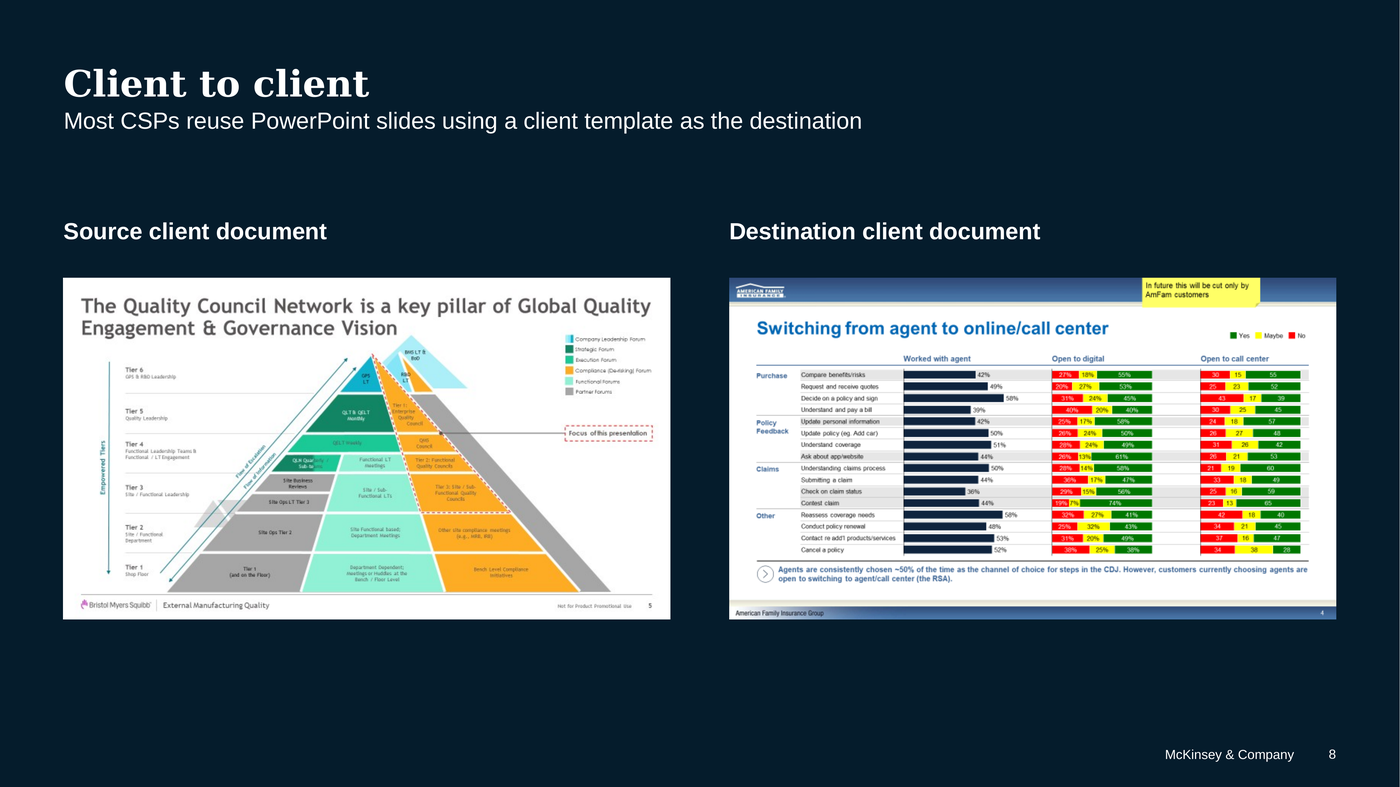
Job: land the content in the destination template without spending the engagement on formatting, and without bringing the last client's master along. The destination is usually a client template.
3. Problem
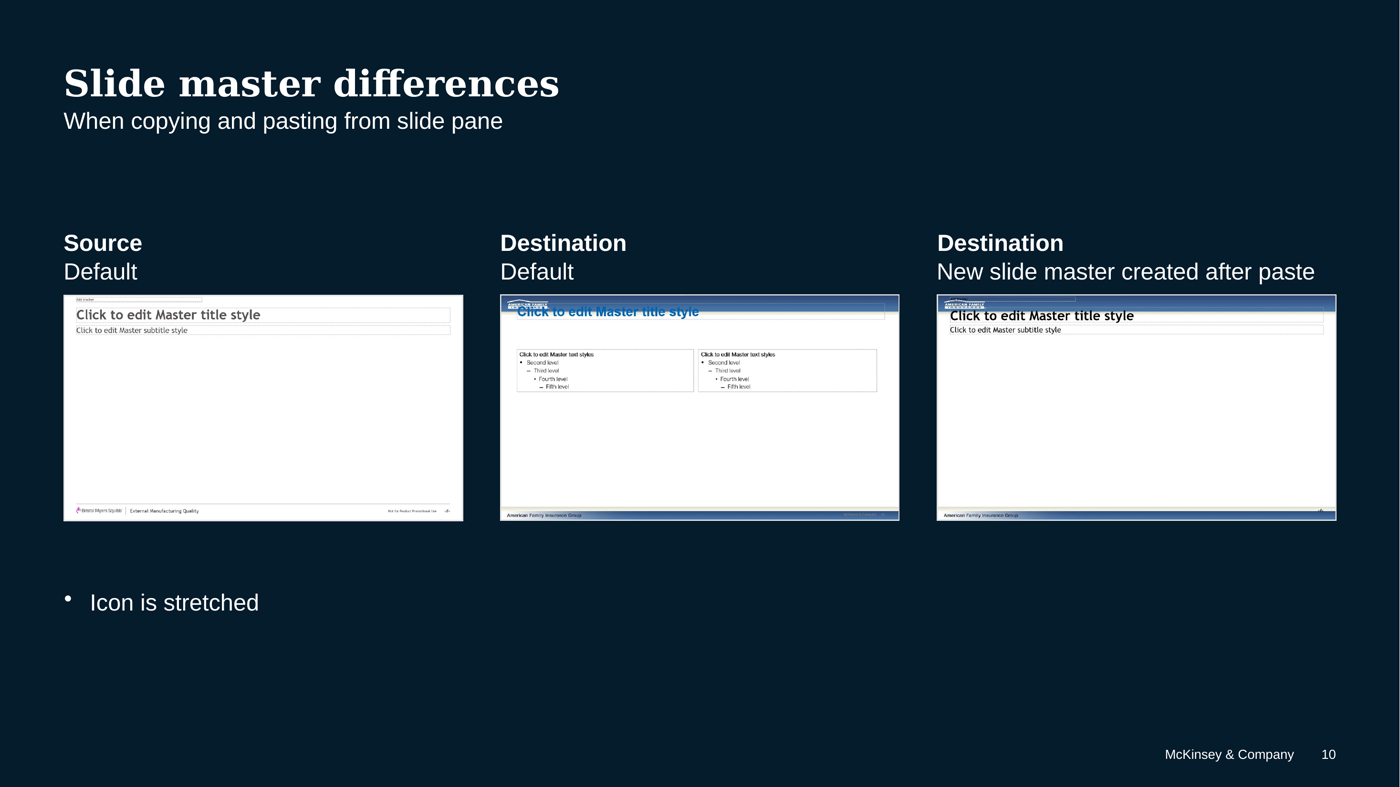
A consultant on a client engagement is trying to reuse slides from an existing PowerPoint document. When they copy and paste previous slides into the new document, the layout breaks, because the client slide masters use different fonts, colors, and layout. They get frustrated. They spend a few minutes trying to fix it, then they send it to the graphics team.
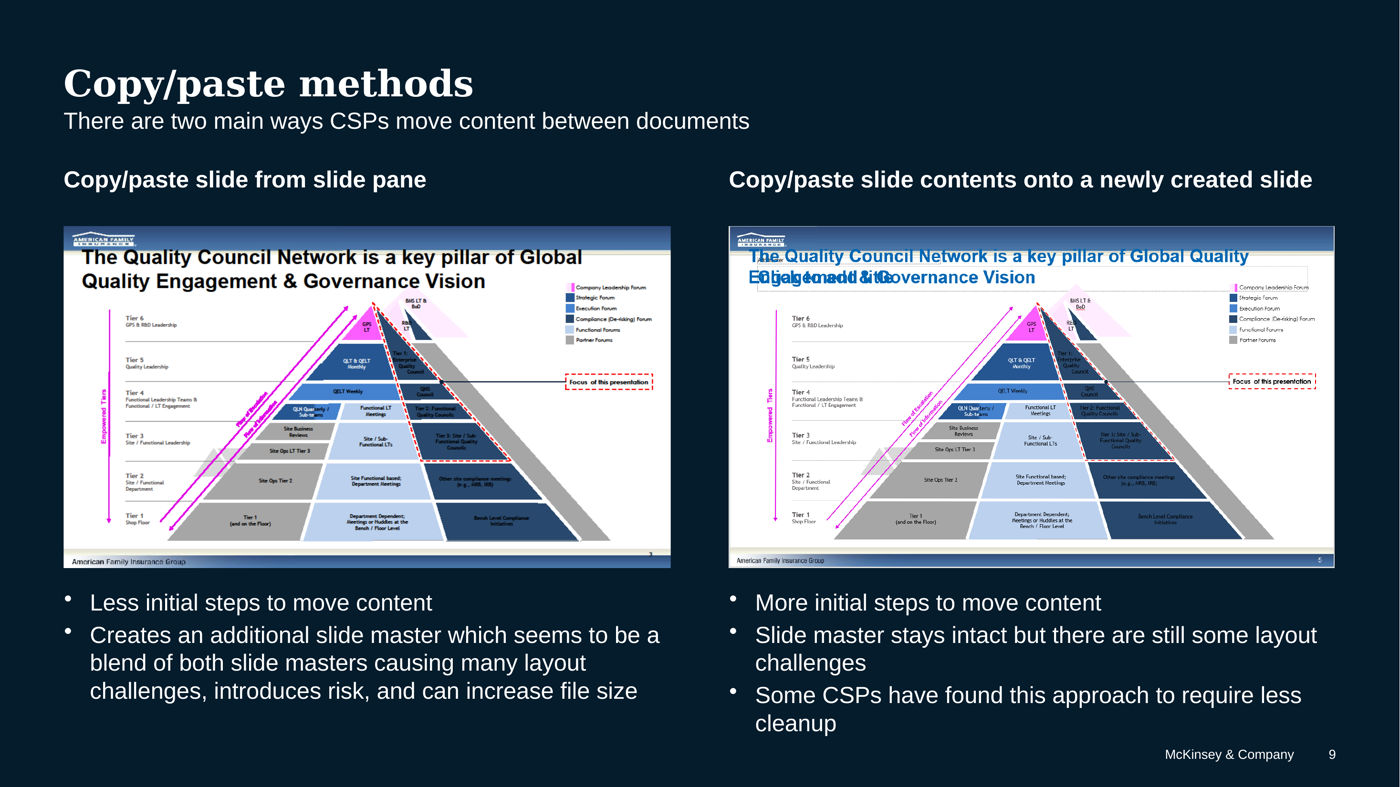
The existing format tool only converted templates to the firm template. Consultants were often creating client templates. Many were unaware of the feature. It did not handle colors. It did not always span content to margins. Whole-slide paste created orphan masters that mixed source and destination: leftover fonts, logos, colors, layouts. Consultants wasted time cleaning those objects. The mixed masters could be reused by mistake. They increased file size. That is a risk problem, not only a tidy-file problem. Open responses described ending up with 10+ master versions, color jumping to white on white, and 4:3 objects misaligned on a newer layout.
Fonts, colors, unwanted objects, and object location were the worst, especially on org-chart and process-flow slides.
4. Constraints
- Two paste methods. Whole-slide paste from the slide pane is faster and creates a blended master: risk, layout breakage, and file size. Object paste onto a new slide keeps the destination master and still needs cleanup. Some consultants had already found object paste required less cleanup. Any solution has to respect both methods, or replace the dangerous one.
- Client-to-client is the common path, not only firm-template-to-client. Consultants source from client documents or firm documents. They usually ship in a client format.
- Destination fonts and languages change text-box size. Objects overlap. Source and destination content areas and margins vary, so objects do not maximize the destination.
- Not every source color has a destination equivalent. Contrast fails. White on white showed up in open responses.
- Finding the slide is its own time sink. Recommended slides did not always include the file already open. Consultants kept private libraries because search cost them.
- There was no clean way to load a slide master onto an open document. The workaround was open the client file, save as, delete every slide but one.
- macOS vs PC feature parity was a parallel platform constraint, not the reuse study. I wrote a macOS PowerPoint satisfaction readout (18 January 2023) from a survey fielded 13 December 2022 to 3 January 2023 (21 days). 1033 responses, 17.2% of 6014 MacBook users (survey slides 2 and 12). Overall experience: 497 satisfied / 184 dissatisfied of 811. 71% were familiar with the McKinsey tab (n=616). 45% use a PC mainly for PowerPoint (n not on the slide). Shortcuts, think-cell stability, and a "what's new" surface are platform issues. They are why this was a product I owned, not a one-off deck. These counts are method for the platform, not a reuse outcome.
5. Process
Research goals: understand consultant challenges, rank them, see whether the existing format tool helped, and decide whether to promote a new workflow or extend the current one.
Method, from the Q1 2023 readout:
- Stakeholder interviews with Product, the graphics team, research, and media design.
- Screener of people in PowerPoint usage stats who had used the existing format tool.
- Graphics-team requesters tracked 7 June to 7 July. The list included 80+ consultants working on engagements, and 65 from LOPs as labelled in the screener. They sent multiple requests in that window.
- Then 9 consultant interviews.
Reuse frequency, n=276: 74 several times a day, 139 a few times a week, 38 a few times a month, 24 occasionally, 1 never.
Challenges, n=768, bar values: inconsistent color palette 152, misaligned objects or text 117, orphan layouts 113, remove old client fonts 93, difficulty applying client identity to the firm template 85, remove unneeded objects 69, client data copied inadvertently 62, unable to restore text style defaults 57, other 20.
How they tackle those challenges, select all that apply, subtitle 479: try to fix them manually 203, send to the graphics team 179, design the slide from scratch 55, use tools such as the existing format tool 41, ask a colleague 19.
Format-tool awareness chart: 63 No / 37 Yes. The slide does not state n. Most were not aware of the tool I would have inherited as the strategy.
I designed against the sourced challenge counts: paste and masters first (orphan layouts, identity, leftover fonts), then object mapping, then color, then findability. I do not treat these counts as a production outcome.
The cut. Do not create a copy of the source slide master in the destination document. That single rule is the product. Everything else (object picker, color mapping, preview) is how you make the rule usable. I did not treat the existing format tool as the strategy, because it only knew the firm template. I owned the workstream. Product signed off. Engineering signed off.
6. Key decisions
- Paste hero. Paste from source to destination. Select a destination master. Choose objects (grouped or individual). Map text boxes to destination content areas. Shrink text to box or resize box to text. Preview. No new master. The same flow has to work for any destination master, not only the firm template.
- Color schemer. Identify custom colors. Replace from the destination scheme, keep original, or create new. Contrast check so text and background cannot match.
- Scale to the destination, not the source. Proportionate scaling. Identify margins. Fill the destination content area.
- Icons and objects. Identify icons and suggest destination replacements. Option to paste only objects.
- Import a master on purpose. Upload a slide master from an existing document when that is the intent. Accidental import is the bug.
- Enhanced selection pane. Edit object content there, similar to a footnote flow: decide what carries over.
7. What shipped
I specified the reuse workflow in the Q1 2023 study and in a dedicated Slide Reuse design file: paste without importing a master, object mapping, color mapping, preview. In the same body of platform work I designed ribbon, directory, slide management, and what's new. I owned the workstream from concept through release. Product signed off. Engineering signed off. These files do not include a production release note for reuse. I do not treat reuse as shipped.
8. Outcome or learning
Consultants reuse slides a lot. The pain is layout and risk, not lack of templates. The largest sourced challenge counts were color, misaligned objects, and orphan layouts. Client data copied on paste was in the list. It was not the largest bar. The existing format tool was not the reuse tool they thought they had. It pointed at the firm template. Their destination was usually a client template.
The failure mode was orphan masters, leaked client identity, and graphics-team load. The cut I made was one rule: adapt to the destination master. Do not import the source.
I would instrument graphics-team volume and cleanup time before treating reuse as shipped. I do not claim production.